
CAQH ProView for Providers: How to Set Up and Stay Attested
CAQH ProView is a free online profile where providers store their credentialing information once and share it with the health plans they choose. Many commercial and Medicaid plans pull credentialing applications from it instead of using their own paper forms. This guide covers how to set up a profile, which documents to upload, how plan authorization works, the 120-day attestation cycle and the mistakes that delay network approval.
| Key takeaways CAQH ProView is free for providers, and the provider controls which plans can see the profile.A profile must be complete, attested and authorized before a plan can use it.Providers re-attest at least every 120 days to keep the data current.Expired documents and mismatched addresses are common causes of credentialing delays. |
What CAQH ProView Does in Credentialing
Before CAQH, every health plan asked for the same details on its own application. ProView replaces that with one shared profile. The plan still runs its own credentialing review, but it pulls the application data from the profile instead of chasing the practice for forms.
ProView is one step in a larger process. Our step-by-step guide to the medical credentialing process shows where it fits alongside payer applications, verification and contracting.
Plans also use the profile at recredentialing. As one example, Colorado Access states in its provider credentialing and recredentialing policy that it uses CAQH to obtain applications and recredentials at least every 36 months. Other plans set their own cycles, so check each plan’s provider manual.
How to Set Up a CAQH ProView Profile
Setup takes longer the first time, so block out time and gather documents before starting. CAQH’s own guide for participating organizations on engaging providers in ProView notes that providers can save each page and return later.
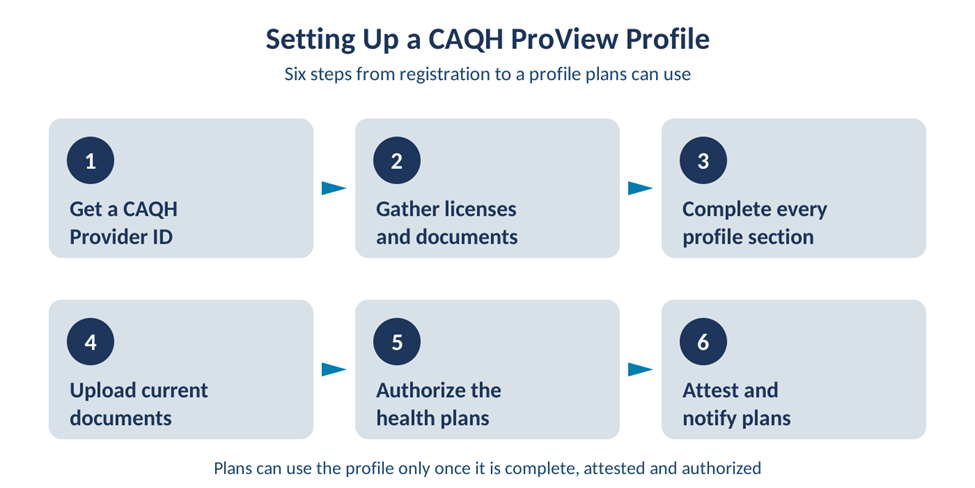
- Get a CAQH Provider ID. A health plan may send one in a welcome letter, or the provider can self-register on the ProView portal.
- Gather licenses, certificates and history before you start, using the checklist below.
- Complete every section: personal details, education and training, specialties, practice locations, hospital affiliations, liability insurance, work history and disclosure questions.
- Upload current copies of each document so plans do not have to request them.
- Authorize health plans to view the profile, either all participating plans or the specific plans you are applying to.
- Review, attest and give your CAQH Provider ID to each plan you apply to.
Document checklist for a new profile
| Document | Why plans ask for it |
| State medical or professional license | Confirms the provider can practice in each state served. |
| DEA and state controlled substance registrations | Required when the provider prescribes controlled drugs. |
| Malpractice insurance certificate | Shows current coverage, limits and dates. |
| Board certification, if held | Verifies specialty training claims. |
| CV with month and year work history | Lets plans review history and spot gaps. |
| Group W-9 and NPI details | Ties the provider to the billing entity. |
Explain any gaps in work history in writing. Many plans ask about longer gaps, and a short note up front avoids a follow-up request.
Practice Managers and Multi-Provider Groups
Groups with several providers can use the ProView Practice Manager module to maintain shared data such as practice locations, credentialing contacts, hospital affiliations and liability insurance. Staff can then export that data to each provider, who reviews it and decides whether to import it into their own profile.
This saves time but does not remove the provider’s role. Each provider remains responsible for reviewing and attesting their own profile. When you add nurse practitioners or physician assistants, they need their own profiles too, as our guide to billing for nurse practitioners and physician assistants explains.
The 120-Day CAQH Attestation Cycle
Attestation is the provider’s confirmation that the profile is accurate and complete. Providers re-attest at least every 120 days, even when nothing has changed.
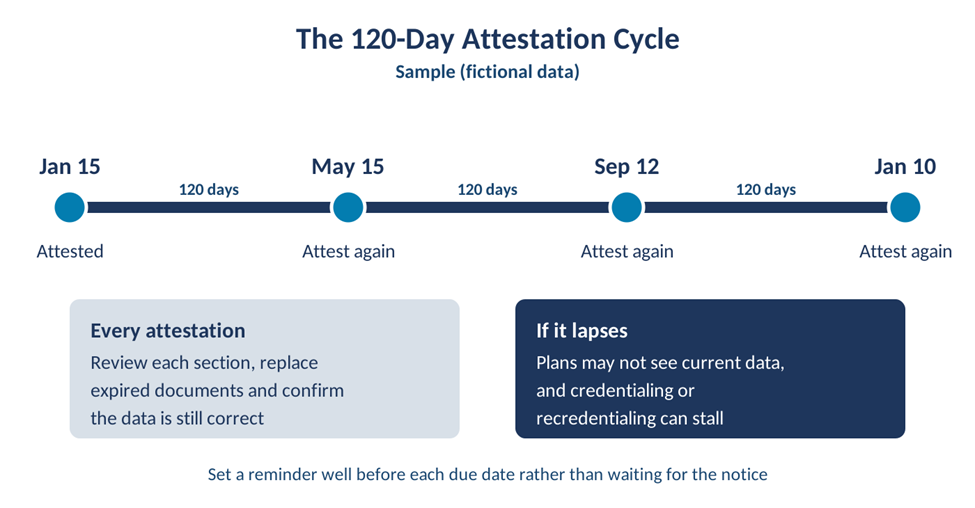
Sample (fictional data). A provider who attests on January 15 is due again by May 15, then September 12, then January 10. Change the first date to your own last attestation and add 120 days each time.
Letting attestation lapse has real consequences. Priority Health warns in its provider manual notice on CAQH re-attestation that it may not be able to recredential providers who have not re-attested, and their contract may be terminated. Each re-attestation is also the right moment to upload renewed licenses and insurance certificates.
Common CAQH ProView Mistakes and How to Fix Them
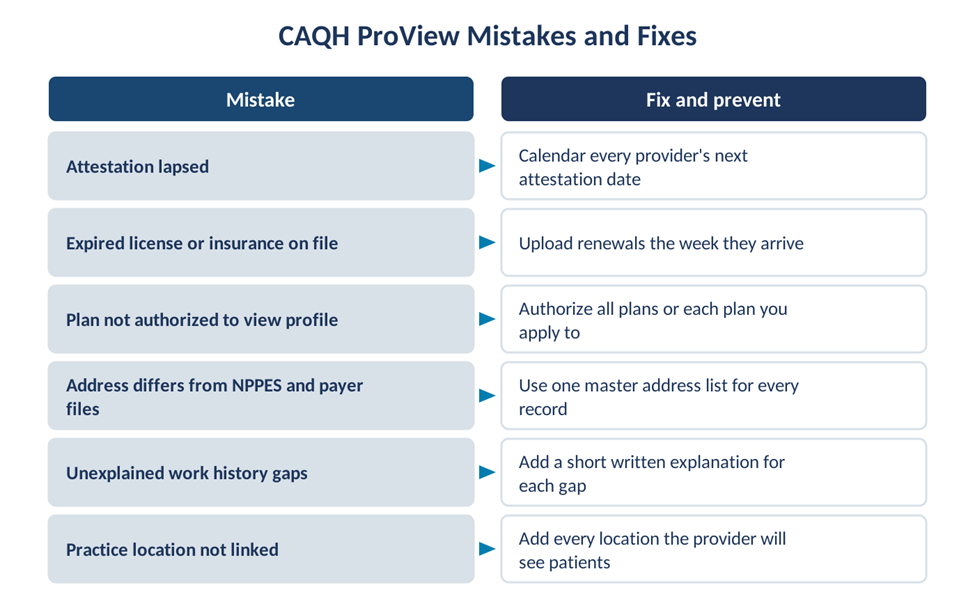
Most delays trace back to six problems: lapsed attestations, expired documents, plans that were never authorized, mismatched addresses, unexplained work history gaps and missing practice locations.
Address mismatches deserve special attention. The address in CAQH should match NPPES, payer records and Medicare enrollment, because plans compare them during review. Keep one master list of every provider’s locations and update all records together.
Speed matters too. A clean, attested profile is one of the simplest ways to shorten network approval, and our quick payer guide to fast provider credentialing covers other ways to reduce the wait.
Managing CAQH In-House or With a Partner
For a solo provider, CAQH upkeep is a few reminders a year. For a growing group, tracking attestations, renewals and plan authorizations across many providers becomes a steady workload. Practices weighing that trade-off can read about the benefits of outsourcing provider credentialing.
Frequently Asked Questions
Does CAQH ProView cost anything for providers?
No. CAQH ProView is offered to providers at no charge. Providers use it to store their credentialing data once and share it with the health plans they choose. Some practices pay outside credentialing staff to maintain profiles, but the profile itself has no fee for the provider.
How often do you need to attest in CAQH?
Providers re-attest at least every 120 days. Attesting confirms the profile is accurate and complete, even if nothing changed. If attestation lapses, plans may not be able to use the profile, and some plans state they may not recredential the provider. Set reminders ahead of each due date.
How long does it take to complete a CAQH profile?
Plan on roughly two hours or more for a first profile, depending on how many locations, affiliations and licenses the provider has. Gathering documents first makes it much faster. Providers can save each page and return later, and updates after the first profile usually take far less time.
Do health plans automatically see my CAQH profile?
No. The provider controls access. You can authorize all participating plans or only selected ones, and a plan can view the profile only after it is complete, attested and authorized. You still need to apply to each plan and give it your CAQH Provider ID.
Getting Help With CAQH ProView
A well-kept CAQH ProView profile makes every credentialing and recredentialing cycle smoother. Complete it fully, keep documents current, authorize the right plans and attest on time. EZMedPro provides credentialing and contracting services for medical practices with a US-based team. If you are adding providers or plans, get in touch with the EZMedPro team to talk through your needs. Timelines and results vary by practice and payer.
Sources: CAQH, Participating Organizations Guide to Engaging Providers in CAQH ProView; CAQH ProView Practice Manager Quick Reference Guide; Priority Health provider manual notice on CAQH re-attestation; Colorado Access Policy CR-301 on provider credentialing and recredentialing. This article is general information; plan requirements vary, so confirm details in each plan’s provider manual.

