
Billing Software vs Billing Service: How to Choose the Right Model in 2026
Billing software vs billing service is a choice between a tool and a team. Medical billing software is a platform that practice staff operate to create, scrub, submit and track claims, while a billing service is an outside company whose staff perform those tasks for a fee, usually a percentage of collections.
Most practices frame this as a technology question, and that framing causes expensive mistakes. Software never works a denied claim on its own. A service never replaces the need to know where your money goes. The real question is who will do the daily billing work, and how well that person is supported. This guide shows the cost math, the hours math and the compliance rules behind each choice. A scored self-assessment near the end helps you apply the numbers to your own practice.
The decision usually surfaces at a handful of moments: a billing employee resigns, days in A/R start creeping up, a new payer contract adds rules, or a growing practice outgrows a single biller. Each moment changes the answer, which is why this article gives conditions rather than a single winner. Where a number comes from a named source, the source is shown. Where it is an industry habit or an illustration, the text says so.
The Numbers Behind the Decision
Eight figures frame most software-versus-service comparisons: software subscription ranges, service fee ranges, the loaded cost of a billing employee, the clean claim rate, the denial rate, days in A/R, benefits load and the Medicare filing limit. The table gives practical ranges and review cadence. Track them against your own reports and the medical billing KPIs every practice should track.
| Metric | Practical target or range | Review frequency | Source type |
| Software subscription | Entry tiers up to about $325 per user per month or $129 flat per practice per month; high-end tiers up to $700 per user or $327 flat | At purchase and renewal | B |
| Service fee | Roughly 4%–10% of collections | At signing and renewal | B |
| Billing and posting clerk wage | $48,500 median annual wage (May 2025) | Annually | A |
| Benefits share of compensation | 30.0% of private-industry compensation (June 2026), so loaded cost is wage ÷ 0.70 | Annually | A |
| Clean claim rate | About 95% or higher is a commonly cited goal; no federal mandate | Monthly | C |
| Initial denial rate | Commonly cited range of 5%–10%; segment by payer | Monthly | C |
| Days in A/R | Commonly cited goal of about 30–40 days; varies by specialty and payer mix | Monthly | C |
| Medicare filing limit | 12 months from the date of service for fee-for-service claims | Per claim | A |
Source labels: A = data or rule from a named agency (BLS, CMS regulation). B = named industry pricing guide (Software Advice, January 2026). C = commonly reported across industry sources, a practical target and not a mandate. Software prices vary by vendor, and quotes should be requested in writing.
Billing Software vs Billing Service: What Is the Real Difference?
Billing software is a set of tools, and a billing service is a set of people who use tools. Software usually bundles a practice management system for scheduling and charges, a clearinghouse connection that routes claims to payers in standard electronic formats, and a claim scrubber that checks claims before submission, which the guide to claim scrubbing and denials explains. The features to look for in billing software cover these pieces in more depth.
A billing service takes over the work itself: charge entry review, claim submission, payment posting, denial follow-up and patient statements. Services often work inside the practice’s software, or inside the vendor’s own platform, so the two choices are not mutually exclusive. Ask every vendor which system holds the data, because that answer decides who controls your records if the relationship ends. The ultimate guide to medical billing services walks through service scopes.
The practical consequence is simple. Buying software buys capability, while hiring a service buys capability plus labor, plus the expertise to use it. Every comparison below turns on whether your practice already has that labor and expertise in-house, and whether those people will still be there next year.
Who Does Each Billing Task Under Each Model?
Software leaves almost every task with your staff, while a service shifts most tasks to the vendor and leaves oversight with you. The table below assigns each core revenue cycle management (RCM) task, so you can see how much work you are actually taking on. Illustrative responsibilities vary by contract, which is why written scopes matter.
| Task | With billing software | With a billing service |
| Insurance verification | Your staff | Often your staff, sometimes the service |
| Charge entry and coding review | Your staff | Service, with provider sign-off |
| Claim scrubbing and submission | Software checks; your staff fix and send | Service |
| Payment posting | Your staff | Service |
| Denial work and appeals | Your staff | Service |
| Patient statements and calls | Your staff | Varies; confirm in contract |
| Reporting and review | Your manager reads reports | Service produces; your manager reviews |
Illustrative division of duties; actual scopes differ by vendor and contract, so confirm each line in writing before signing.
In billing audits, a common pattern is that practices buying software count the license fee but overlook the unassigned tasks. Nobody owns denial follow-up, so aged claims pile up quietly. A task table like this one, filled in with names, exposes the gap before it costs money.
What Does Each Option Cost, and Where Does the Fee Break Even?
Software is mostly a fixed cost plus staff time, and a service is mostly a variable cost tied to collections. Software Advice’s January 2026 pricing guide lists entry-level plans up to about $325 per user per month or $129 flat per practice per month, with high-end plans up to $700 per user and $327 flat. The same guide says outsourced billing usually keeps roughly 4% to 10% of collections.
The cost comparison needs three inputs: software cost, staff cost and your collections. Loaded staff cost starts with the $48,500 median wage for billing and posting clerks reported by BLS for May 2025. BLS reported benefits at 30.0% of private-industry compensation in June 2026, so a loaded estimate is $48,500 ÷ 0.70, or about $69,286. Your local wages may differ.
Break-even service fee (%) = (In-house annual cost − Oversight cost of a service) ÷ Annual collections × 100
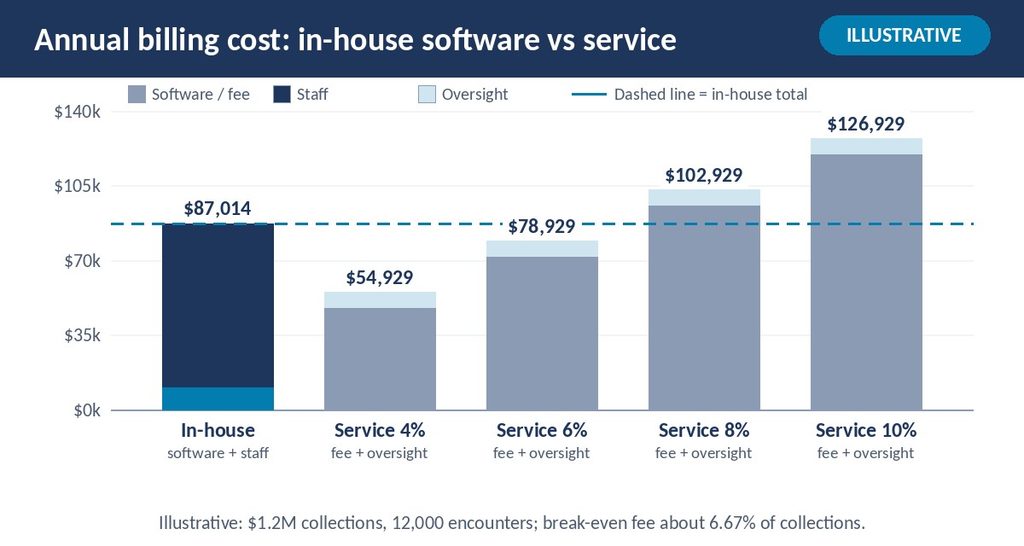
Illustrative scenario (not an actual client record): a three-provider practice collects $1,200,000 a year across 12,000 encounters. It pays $300 per provider per month for software, which is $10,800 a year, and needs about 1.1 billing employees at $69,286 each, or about $76,214. In-house cost totals $87,014, which is 7.25% of collections or $7.25 per encounter.
A service still needs oversight. Assume 0.1 of an employee, about $6,929, reviews reports and handles questions. The break-even fee is ($87,014 − $6,929) ÷ $1,200,000, or about 6.67%. Below that fee, the service costs less on paper. Above it, in-house costs less, assuming the in-house team performs equally well.
| Service fee | Fee in dollars | Fee plus oversight | Versus in-house ($87,014) |
| 4% | $48,000 | $54,929 | $32,086 cheaper |
| 6% | $72,000 | $78,929 | $8,085 cheaper |
| 8% | $96,000 | $102,929 | $15,914 costlier |
| 10% | $120,000 | $126,929 | $39,914 costlier |
Illustrative arithmetic; assumes equal collection performance, $300 per provider per month software and one wage source. Real quotes, setup fees and add-ons vary.
Sticker price is only the opening comparison. A cheaper option that leaves 3% of collections unworked is more expensive than a pricier option that recovers them. The best medical billing software for small practices is worth comparing alongside any service quote.
Do You Have Enough Staff Hours to Run Software Yourself?
Software only pays off when someone has enough hours to work every claim to completion. Estimate hours with a simple formula, then compare the result with the capacity of the people you actually have. A practice that cannot staff the hours is buying a tool that will sit half used.
Required billing hours = Annual encounters × Minutes per encounter ÷ 60
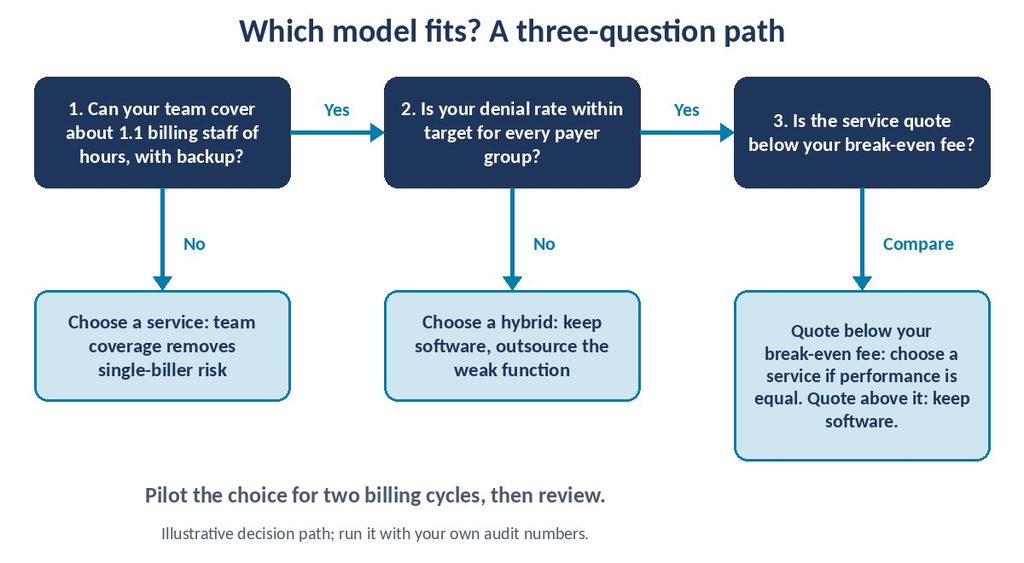
Illustrative scenario (not an actual client record): 12,000 encounters at an assumed 10 minutes of total billing handling each equals 2,000 hours. One employee offers roughly 1,800 productive hours after holidays, leave and training. The workload therefore needs about 1.1 employees before any backlog, and any resignation takes the practice from 1.1 to zero.
Ten minutes is an assumption, not a benchmark. Time your own team on a sample of 50 encounters across payers before relying on any estimate. Include eligibility checks, charge corrections, rejections, posting, denial work and patient questions, because those tasks consume more time than claim submission.
This hours test explains why single-biller practices feel fragile. When one person holds every credential, password and payer relationship, a two-week absence interrupts cash flow. A service spreads that risk across a team, while software alone does not. Do not treat vacation coverage as a minor detail.
Which Option Produces Fewer Denials? Why a Blended Rate Misleads
Neither option produces fewer denials by default. Results depend on who works the claims, how often rules are updated and whether denial patterns are reviewed by payer. Software can raise the clean claim rate through a scrubber, but a human still has to fix each flagged claim. A service can add specialists, yet quality varies by vendor.
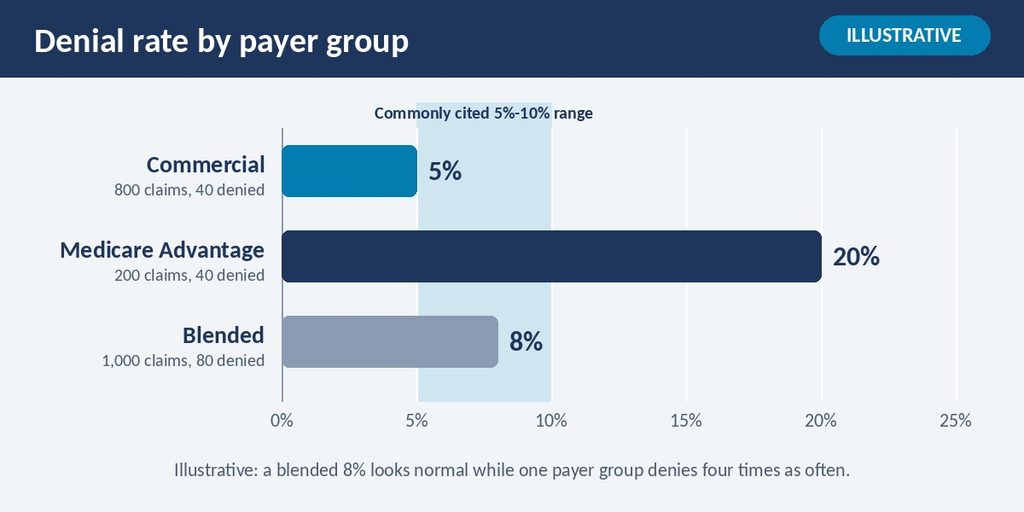
Measure denials by payer, because one blended number hides weak spots. Illustrative scenario (not an actual client record): a practice submits 1,000 claims. Its 800 commercial claims deny at 5%, which is 40 claims. Its 200 Medicare Advantage claims deny at 20%, which is 40 claims. The blended rate is 80 ÷ 1,000, or 8%.
An 8% rate sits inside the commonly cited 5%–10% range, so a manager might relax. Yet one payer group denies four times as often as the other. In billing audits, a common pattern is that a single payer or service line drives most denials, and nobody sees it until reports are split. The clean claim rate guide explains how to segment it.
Ask both options the same question: who reviews denials weekly, and what changes after each pattern? The denial management best practices describe the weekly loop. If the answer is “nobody has time,” the model is not the problem. Capacity is.
What Do Medicare, Medicare Advantage, Medicaid and Commercial Payers Change?
Payer rules change the decision most when billing agents are paid by percentage and when filing deadlines are tight. Medicare fee-for-service requires claims within 12 months of the date of service under 42 CFR 424.44. Medicare Advantage, Medicaid and commercial plans set their own limits in contracts, so the shortest deadline in your payer mix governs how fast the work must flow.
The Medicare rule that surprises many practices sits in 42 CFR 424.73. It allows payment to an agent only when the agent’s compensation is not related in any way to the dollar amounts billed or collected, and not dependent on actual collection. The same section states that payment to an agent is always made in the provider’s name. A percentage-based service therefore needs a compliant account structure, which counsel should review.
| Payer type | What changes the choice | Practical step |
| Medicare fee-for-service | 12-month filing limit; agent payment rules in 42 CFR 424.73 | Confirm where deposits land and how fees are structured |
| Medicare Advantage | Plan-specific edits, prior authorization and appeal windows | Track denials by plan; assign an owner |
| Medicaid | State fee schedules and some state rules on billing agents | Check your state Medicaid manual before signing |
| Commercial | Contract-specific filing limits and edits | Keep a table of each payer’s limits in the contract file |
Illustrative guidance; filing limits, agent rules and fee schedules vary by payer and state, so verify each against your contracts and current manuals.
HBMA’s RCM Advisor (Q2 2026) also treats percentage-based billing as an area needing compliance structuring, and the details sit behind its member access. For that reason, ask any vendor to explain its fee structure in plain language and put the account arrangement in the contract.
What Compliance and Data Risks Come With Each Choice?
Both options involve protected health information, so both need a business associate agreement (BAA). HHS guidance on cloud computing says a cloud service provider that handles electronic protected health information for a covered entity is a business associate, even when it stores only encrypted data. A billing software vendor hosting your data and a billing service handling your claims both fit that description.
Software shifts security duties to your practice more than a service does. You manage user access, password practices, device security and staff training, while the vendor secures its platform. HHS notes that a cloud provider is not responsible for failures attributable solely to the customer’s own actions. With a service, access is spread across the vendor’s team, so ask who can see what and how that access is logged.
Contract language protects the practice only if it is specific, so compare the following items in writing before you sign any agreement. Ask the software vendor and each billing service the same four questions, and keep their answers in your compliance file:
- Whether the vendor signs a BAA and lists subcontractors who touch your data.
- Where data is stored and who can export it, including your exit rights.
- How access is granted, logged and removed when staff leave.
- What happens to claims in progress if the contract ends.
For deeper background, see the guide to HIPAA and OIG compliance in medical billing and the overview of cloud-based medical billing software. The practice remains responsible for the accuracy of the claims it submits, whichever model it chooses, so oversight never fully transfers.
Can You Keep the Software and Hire Help Only for the Hard Parts?
Yes, and many practices end up here. A hybrid setup keeps the software in the practice’s hands while a service takes on the tasks that overload staff, such as denial follow-up, A/R cleanup or credentialing. This works when your front-desk and charge-entry staff are strong, but denials or aged claims pile up.
Hybrid setups need clear lines. Write down which party owns each task, which system of record holds the data and how disputes are resolved. Otherwise, both sides assume the other handled it. In billing audits, a common pattern is that split-ownership arrangements fail on handoffs, not on skills.
Choose hybrid when one or two functions are weak and the rest are healthy. Avoid it when staff turnover is the main problem, because the in-house portion remains fragile. EZMedPro’s medical billing services can be scoped narrowly or broadly, which lets a practice test a limited engagement before widening it.
Decision Rules: Which Option Fits Which Practice?
Software fits practices with stable, trained billing staff, moderate complexity and the time to review reports. A service fits practices with turnover, growth, specialty complexity or no one who can own denials. Use the rules below as conditions, not verdicts, and test each against your own numbers.
| If this is true | Lean toward | Reason |
| One trained biller, steady volume, clean claim rate above 95% | Software | Staff and tools already work |
| Biller resigns or leave coverage is a recurring problem | Service | Team coverage reduces single-point risk |
| Denial rate by payer above your target for two quarters | Service or hybrid | Dedicated denial work is a labor problem |
| Fee quote below your break-even fee | Service, if performance is equal | Lower all-in cost |
| Fee quote above your break-even fee | Software, unless collections improve | Higher all-in cost |
| Strong front end, weak A/R follow-up | Hybrid | Outsource only the weak function |
| Multi-location growth | Service or hybrid | Standard process across sites |
One caution applies to every row: a vendor quote means little without a defined scope. Compare the same tasks across every option, then compare the reports each option will actually deliver to your manager. The guide to understanding medical billing reports shows what a useful monthly package contains.
A Six-Step Process for Making the Call
A structured comparison takes about two to four weeks when your reports are easy to export. Run the steps in order, and keep written notes on each assumption so a partner, owner or board member can challenge them before any contract is signed.
- Pull 12 months of encounters, collections, denials by payer and days in A/R.
- Calculate your loaded in-house cost using the wage ÷ 0.70 method.
- Time your team on 50 sample encounters to estimate hours per encounter.
- Request itemized quotes for software and for a service, listing fees, setup, add-ons and exit terms.
- Compute the break-even fee and compare it with each quote.
- Pilot the winner on a limited set of payers or service lines, then review results after two full billing cycles.
Do step six whenever the quote implies a major change, because a pilot costs less than a failed switch. Skip it only when the practice is already struggling and every extra week of delay costs cash, in which case a faster, closely monitored cutover is the better choice.
How Long Until a Switch Pays Off?
Plan for about 30 to 90 days to onboard a new service or software and for 60 to 120 days before results are comparable. These are planning ranges drawn from general industry practice, not guarantees. Partial results, such as faster claim submission, often appear within the first billing cycle, while full results need several cycles.
Switching creates short-term friction. Claims in progress need clean handoffs, payer enrollments and clearinghouse connections must be confirmed, and staff need training. The guide to transitioning to a new medical billing system outlines a checklist that reduces dropped claims. Run old and new processes in parallel for open claims, and assign one owner for the changeover.
Review three numbers at 30, 60 and 90 days: clean claim rate, denial rate by payer and the days in A/R trend. One weak month is a signal to investigate, not a verdict. Compare like for like, using the same payers and time windows as your baseline.
Which Mistakes Undermine Either Choice?
Most failures trace to unclear scope and missing ownership rather than to the product itself. Use this list as a pre-signing review whether you are buying software or hiring a service, and revisit it at each renewal. Each item is a condition: act on it when the situation described applies to your practice.
- Comparing price without scope. Compare the same tasks, add-ons, setup fees and exit terms.
- Ignoring A/R follow-up. Assign a named owner and a weekly review for unpaid claims.
- Trusting blended metrics. Split denials and days in A/R by payer and service line.
- Skipping the BAA. Sign it before any data moves, and list subcontractors.
- Missing the agent-payment rule. Confirm how Medicare deposits and fees are structured.
- Forgetting data ownership. Require export rights and a written exit plan.
- Deciding once. Rerun the comparison when volume, staff or payer mix changes.
Practices also overlook the cost of staff time spent fixing software errors. Add that rework time to your estimate, because hours spent on corrections are real labor cost even when no invoice shows them. In billing audits, a common pattern is that this hidden time is a frequent gap between a software quote and its true cost.
Recap in Seven Lines
- Software is a tool, and a service is a team using tools.
- Fully loaded staff cost is a practical estimate of wage ÷ 0.70.
- In the illustrative example, the break-even service fee was about 6.67% of collections.
- Check staff hours first, because software without capacity underperforms.
- Segment denials by payer, because a blended 8% can hide a 20% group.
- Both models need a BAA, and Medicare agent-payment rules apply to percentage fees.
- Hybrid setups work when only one or two functions are weak.
Score Your Own Billing Setup
Answer yes or no to each question below. Every “no” points to a section of this guide worth revisiting, and the figures are practical targets unless a named source is given in the text. Score honestly, because a generous score hides exactly the weak spots this exercise is meant to find.
- Do you know your loaded in-house billing cost per encounter?
- Have you timed your team on a sample of encounters?
- Is your clean claim rate at or above about 95%?
- Do you review denials by payer at least monthly?
- Are days in A/R within your own target, such as 30–40?
- Does a named person own denial follow-up every week?
- Could billing continue for two weeks if your main biller left?
- Is a signed BAA on file for every vendor touching patient data?
- Do you know where Medicare deposits land and how any billing fee is structured?
- Can you export your data and claim history on request?
Scoring guide: 8–10 yes answers mean your current setup is working, so test changes only with a pilot. 5–7 means mixed results, so fix the weak areas or try a hybrid model. 0–4 means a strong case to compare a service or a stronger software setup using the break-even formula.
Signs You Have Outgrown Doing It Alone
Outside help makes sense when more effort from the same team will not fix the problem. A single sign can be temporary, but two or more persisting across two quarters suggest a structural issue rather than a bad month, and structural issues rarely fix themselves.
- Denial rates stay above your target for two quarters despite training.
- Aged claims accumulate because no one has hours for follow-up.
- A resignation or leave interrupts submission for more than a week.
- You are adding providers, locations or payers faster than you can hire.
- Reports are late, inconsistent or hard to trust.
When you evaluate a vendor, look for a signed BAA, itemized pricing, named contacts, a written scope and reporting you can read without a consultant. Ask for references from practices of a similar specialty and size. Compare scopes line by line, because the cheapest quote often leaves tasks to you.
EZMedPro is one example of a US-based team that delivers end-to-end billing, coding, credentialing, denial management and compliance support, with transparent reporting and no hidden fees. Results vary by practice, so the right first step is a review of your own numbers. You can see how that works on the revenue cycle management service page.
Expert Insights
The choice comes down to who will do the work and whether that person has time, training and backup. Billing software vs billing service is not a contest between old and new. It is a question of labor, oversight and cost, answered with your own claims data.
Firm published rules in this guide are limited to the BLS wage and benefit data, the Medicare 12-month filing limit, the agent-payment language in 42 CFR 424.73 and HHS guidance on business associates. The pricing ranges come from a named pricing guide, and the 95% clean claim rate, the 5%–10% denial range and the 30–40 day A/R goal are practical conventions. Every dollar example is illustrative.
Your natural next question is what your own break-even fee looks like. Pull 12 months of collections, encounters and denials by payer, then run the formula. If you want a second set of eyes, EZMedPro’s team can walk through the numbers with you on its revenue cycle management service page.
Common Questions About Billing Software and Billing Services
Is billing software cheaper than a billing service?
Software often costs less at the sticker level, but it adds staff time, training and oversight. A service charges a percentage of collections, commonly 4% to 10% in published pricing guides. Compare all-in costs using the break-even formula, and include collections performance, not only fees.
What is a good clean claim rate?
About 95% or higher is a commonly cited goal, though no federal mandate sets it. Measure it monthly and split it by payer, because a blended rate can hide weak groups. A falling rate is a signal to review scrubber edits, front-end data entry and recent payer changes.
What is a good days in A/R target?
Many practices aim for roughly 30 to 40 days, a practical convention that varies by specialty and payer mix. Track it monthly and look at aging buckets, since an average can hide old balances. Compare your trend against your own baseline before judging a single month.
What is a good fee for a medical billing service?
No single standard exists. Software Advice’s January 2026 guide says outsourced billing usually keeps about 4% to 10% of collections, depending on scope and specialty. A good fee is one below your break-even fee that includes a clear scope, reporting and fair exit terms.
Do I need a BAA with billing software or a billing service?
Generally yes. HHS says a cloud service provider that handles electronic protected health information for a covered entity is a business associate, even when it stores only encrypted data. A billing service that accesses patient records also qualifies. Consult counsel for your situation and confirm state requirements.
Can I use billing software and a billing service together?
Yes. A hybrid setup keeps the software in-house while a service handles overloaded tasks, such as denial follow-up or A/R cleanup. It works best with a written split of duties, one system of record and monthly reviews. It adds coordination work, so choose it when the gains outweigh that effort.
Where These Numbers Come From
(a) Published standards and definitions from named bodies
- U.S. Bureau of Labor Statistics, Occupational Outlook Handbook, Financial Clerks: billing and posting clerks, median annual wage $48,500 (May 2025).
- U.S. Bureau of Labor Statistics, The Economics Daily, private-industry compensation costs, June 2026 (benefits 30.0% of compensation).
- U.S. Department of Health and Human Services, Guidance on HIPAA and Cloud Computing.
- 42 CFR 424.73, Prohibition of assignment of claims by providers (agent payment conditions).
- 42 CFR 424.44, time limits for filing Medicare claims.
(b) Named benchmarking data providers
- None used. No proprietary benchmark data, such as MGMA DataDive, was available for this article.
(c) Practical or illustrative targets from general industry sources
- Commonly reported targets: clean claim rate of about 95% or higher, denial rate of 5%–10% and days in A/R of about 30–40.
- Software Advice, Medical Billing Software Pricing Guide (B. Bali, January 30, 2026): subscription and outsourced percentage ranges.
- HBMA RCM Advisor, “Percentage-Based Medical Billing” (L. Murphy, Q2 2026): compliance considerations.
- Minutes per encounter, productive hours and oversight time in the examples are assumptions.
(d) Survey or study data with named source
- None used for figures in the article body.
Methodology. Top-ranking vendor guides were reviewed in October 2026 to find gaps in coverage. All dollar figures in the scenarios are illustrative arithmetic, not client records or outcomes. Results vary by practice, and figures reflect information available at the time of research in October 2026. Payer rules, fee schedules and code sets change annually, so recheck them before acting.

