
Cloud-Based Medical Billing Software: A Buyer’s Guide
Cloud-based medical billing software is billing and practice management software that the vendor hosts on its own servers and you use through a web browser, usually for a monthly subscription. It handles eligibility checks, charge entry, claims, remittance posting, patient statements and reporting without servers in your office.
This guide compares cloud and on-premise systems, lists the features to test, explains HIPAA and business associate rules, and walks through choosing and switching vendors. Software is only part of the job; our medical billing and practice management services include system setup and the billing work itself.
| Key takeaways Cloud billing software moves hosting, updates and backups to the vendor.The vendor is a HIPAA business associate, so you need a signed business associate agreement.Test eligibility, claim scrubbing, ERA posting and denial work queues with your own data.Plan your data export before you sign, not when you leave. |
Cloud vs. On-Premise Billing Software
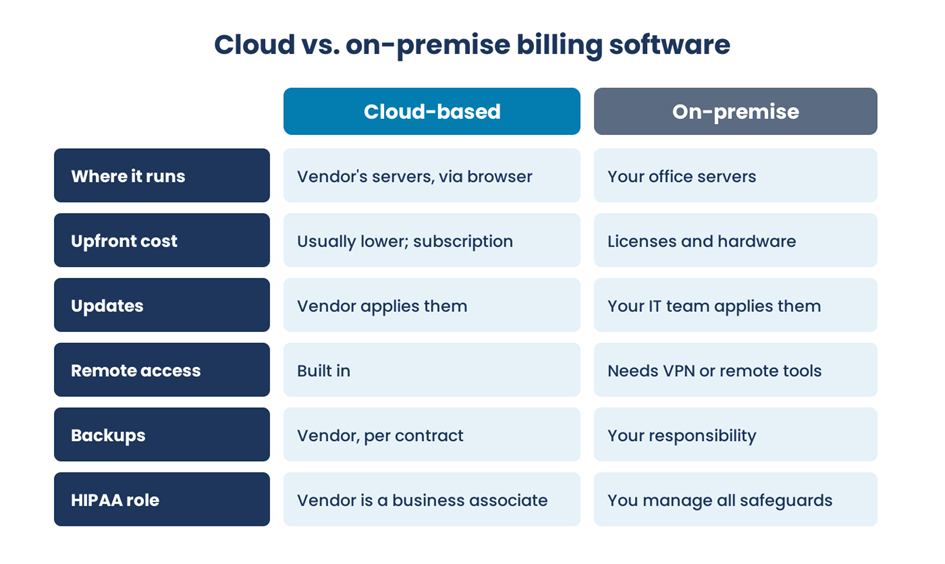
In short, cloud software runs on the vendor’s servers with a subscription, built-in remote access and vendor-managed updates and backups. On-premise software runs on your own servers, so you buy licenses and hardware and your IT team handles updates, backups and most security work. With cloud software, the vendor becomes a HIPAA business associate and shares that security work under contract.
Features to Look For
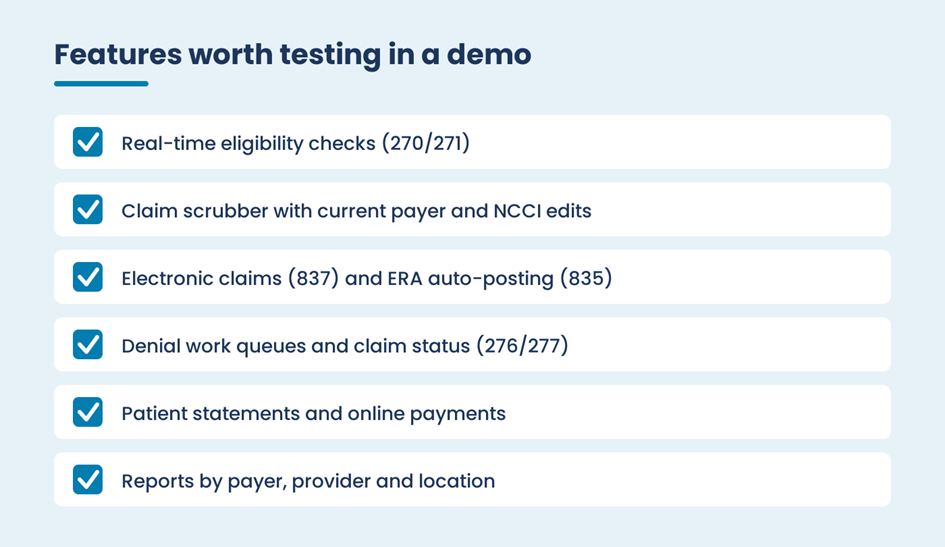
Whatever the hosting, the software has to support the standard electronic transactions: eligibility checks (X12 270/271), claims (837), claim status (276/277) and electronic remittance advice, or ERA (835), with automatic posting. A claim scrubber should apply payer edits and the Medicare NCCI edits CMS updates every quarter.
Beyond the basics, look for denial work queues, patient statements with online payment, and reports you can break out by payer, provider and location. EHR integration matters too, so charges move from the clinical note without re-keying. Our article on medical billing software features to look for goes deeper on each one.
HIPAA, Security and the Business Associate Agreement
A cloud vendor that stores or processes your patients’ billing data is a HIPAA business associate, even if it only holds encrypted data and can’t read it. HHS says you may use a cloud service only with a signed business associate agreement (BAA), and that the agreement should cover backups, data availability and returning or destroying data when the contract ends, as explained in its guidance on HIPAA and cloud computing.
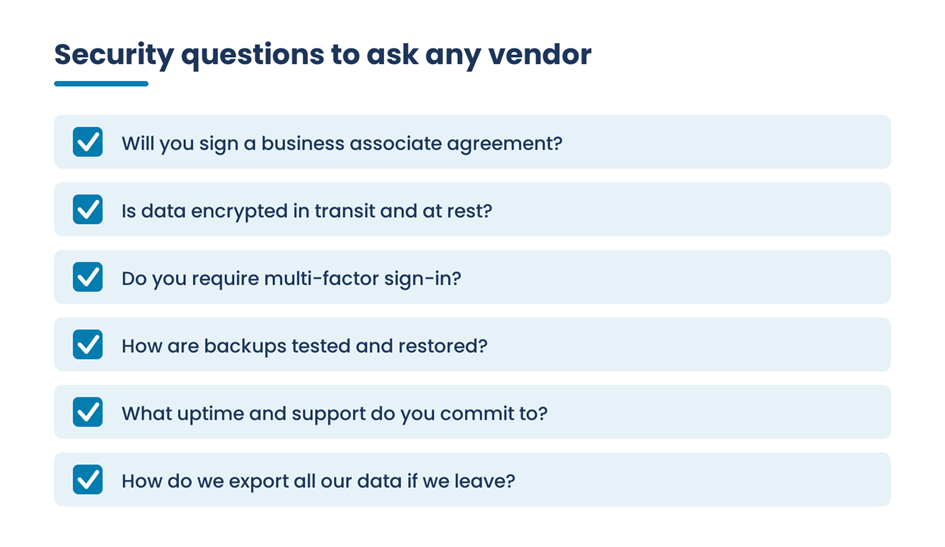
Ask every vendor whether it will sign a BAA, how data is encrypted in transit and at rest, whether multi-factor sign-in is required, how backups are tested, what uptime and support it commits to, and how you’d export all your data if you leave. Our guide to data security and privacy in medical billing covers the practice-side safeguards that still apply.
Software or Outsourced Billing?
Software doesn’t work denials or call payers by itself; someone still has to run the workflow. Small practices often weigh a cloud system run in house against a billing company that brings its own system or works in yours. Our comparison of billing software vs. a billing service lays out the trade-offs, and our list of medical billing software for small practices helps if you’re keeping billing in house.
How to Choose and Switch Vendors
- List what you need. Note your specialties, payers, locations, EHR and the reports you use every month.
- Run demos with your own scenarios. Ask each vendor to check eligibility, scrub a tricky claim and post a sample ERA in front of you.
- Check the clearinghouse. Confirm which clearinghouse the vendor uses and that your main payers are connected.
- Read the contract. Look at the BAA, uptime and support terms, price increases, term length and data export at exit.
- Plan the data move. Decide what moves over, such as patients, insurance details and open balances, and keep old-system access for working the remaining A/R.
- Train and run in parallel. Train each role, then watch the first weeks of claims and remittances closely.
How long a switch takes depends on practice size, data cleanup and integrations, so build in time for testing. Our guide to transitioning to a new medical billing system covers the cutover in detail.
Frequently Asked Questions
What is cloud-based medical billing software?
Cloud-based medical billing software is a billing and practice management system the vendor hosts on its own servers, which your staff use through a web browser. It covers eligibility checks, charge entry, claim submission, remittance posting, patient statements and reporting, usually for a monthly subscription instead of upfront licenses and hardware.
Is cloud medical billing software HIPAA compliant?
The software can support HIPAA compliance, but compliance depends on how it’s set up and used. The vendor is a business associate and must sign a business associate agreement with your practice. You still control user access, staff training and your own policies, so both sides share responsibility for protecting patient data.
Is cloud billing better than on-premise software?
For most small and mid-size practices, cloud software is easier because the vendor handles hosting, updates and backups, and staff can work remotely. On-premise systems give more direct control but need your own IT support and hardware. The better choice depends on your budget, IT resources and how much control you want.
What should a small practice look for in cloud billing software?
Look for reliable eligibility checks, a claim scrubber with current edits, ERA auto-posting, simple denial work queues, patient payment options, clear reports and an EHR connection. Confirm the vendor will sign a business associate agreement and that you can export all your data. Test everything with your own claims before you sign.
Get Help Setting Up or Running Your Billing
Cloud-based medical billing software works best when the setup is right and someone owns the workflow every day. If you’re choosing a system or struggling with the one you have, contact the EzMedPro team to talk it through.
Sources: HHS Office for Civil Rights guidance on HIPAA and cloud computing; CMS Medicare NCCI edits; X12 electronic transaction standards. No vendor is endorsed. Billing information only, not legal advice.

